Many distributors want to add laser marking machines, but they worry about product quality, training, service, and customer complaints. I understand this concern because a low-cost machine can create costly problems later.
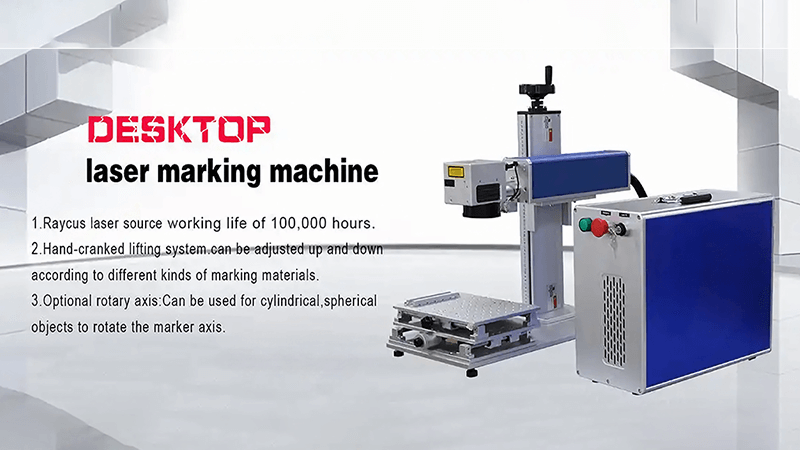
I usually recommend desktop laser marking machines because they are compact, precise, easy to install, and simple to resell. The best option depends on marking material, marking area, production volume, and whether customers need standard fiber, MOPA fiber, UV, or CO2 laser technology.
At Kirin Laser, I work with distributors, importers, workshops, and OEM partners who need machines that fit real production needs. I do not see a desktop laser marking machine as only a small machine. I see it as a practical product line that helps distributors serve many industries with lower storage pressure, simpler shipping, and faster customer acceptance.
What are the best and most popular laser engravers?
Many buyers search for the “best” laser engraver, but the best machine is not always the most expensive one. I focus on matching the laser source, working area, and marking need before I recommend a machine.
The most popular laser engravers are desktop fiber laser marking machines for metal and plastic, MOPA fiber lasers for color marking and anodized aluminum, UV lasers for sensitive materials, and CO2 lasers for wood, acrylic, leather, and packaging materials.
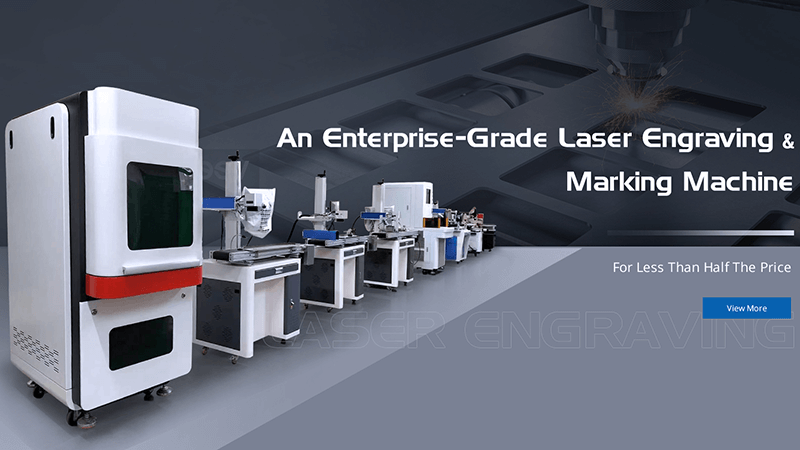
I usually recommend the following seven desktop laser marking machine options to distributors. These configurations cover most common customer needs. They also give distributors a clear product range for different budgets and industries.
1. Standard 20W Fiber Laser Marking Machine
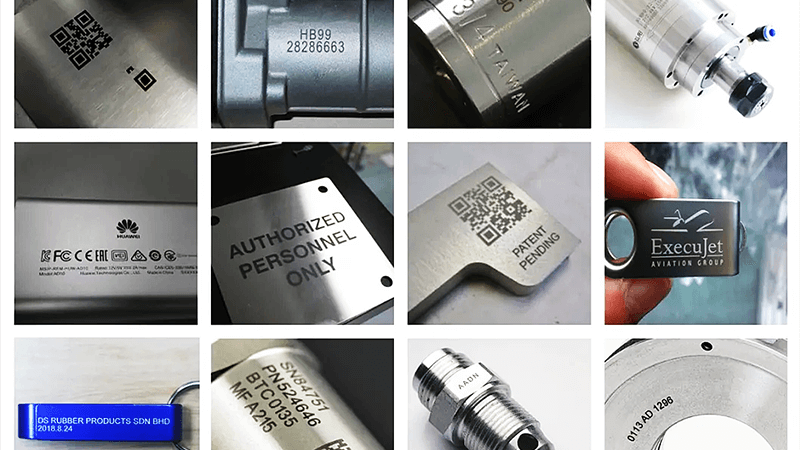
I often recommend a 20W fiber laser marking machine as an entry-level product for distributors. It is suitable for logos, serial numbers, QR codes, barcodes, nameplates, tools, stainless steel, aluminum, brass, and many plastics1.
This machine is easy to sell because many small workshops do not need deep engraving. They need stable marking quality and a compact machine that fits on a table.
2. Standard 30W Fiber Laser Marking Machine
I recommend 30W fiber lasers when customers need faster marking speeds or slightly deeper engraving. This option works well for distributors who sell to metal part suppliers, hardware factories, tool companies, and automotive component workshops.
A 30W machine gives customers more flexibility without a major increase in machine size.
3. 50W Fiber Laser Engraving Machine
I recommend 50W fiber lasers for customers who need deep engraving, mold marking, metal texture work, or faster batch production. This machine is suitable for stronger industrial applications.
It is not always necessary for small logo marking, but it is a strong option for customers who want more power for future projects.
4. MOPA Fiber Laser Marking Machine
I usually recommend MOPA fiber lasers when customers need black marking on anodized aluminum, color marking on stainless steel, or clean marking on sensitive surfaces.
MOPA technology gives more pulse control. This makes it useful for electronics, aluminum products, medical tools, consumer products, and premium metal items.
5. UV Laser Marking Machine
I recommend UV laser marking machines for plastics, glass, coated materials, ceramics, film, and sensitive products. UV lasers create less heat impact than standard fiber lasers.
This makes them useful for customers who need fine marks without damaging the surface.
6. CO2 Desktop Laser Engraving Machine
I recommend CO2 lasers for non-metal materials. These machines are useful for wood, leather, acrylic, paper, rubber, fabric, packaging, and some coated materials.
A CO2 machine is not a replacement for a fiber laser. It is a different tool for a different material group.
7. Desktop 3D Dynamic Fiber Laser Marking Machine
I recommend 3D dynamic marking machines for large work areas, curved surfaces, deep engraving, and complex products2. This option is useful for customers who need more than simple flat marking.
It is often a premium product for distributors who want to serve higher-value industrial customers.
| Machine Type | Best Materials | Common Applications | Best Buyer Type |
|---|---|---|---|
| 20W Fiber Laser | Metal, plastic | Logos, QR codes, serial numbers | Small workshops |
| 30W Fiber Laser | Metal, plastic | Batch marking, tools, components | General industrial users |
| 50W Fiber Laser | Metal | Deep engraving, molds, nameplates | Heavy-duty users |
| MOPA Fiber Laser | Anodized aluminum, stainless steel | Black marking, color marking | Premium product users |
| UV Laser | Plastic, glass, film | Fine marking, electronics | Sensitive material users |
| CO2 Laser | Wood, acrylic, leather | Crafts, packaging, signs | Non-metal users |
| 3D Dynamic Laser | Metal, curved surfaces | Large area, deep engraving | Advanced industrial users |
I once worked with a distributor whose customers needed compact marking machines for small workshops. Those customers worried about space, training, and stable marking quality. I recommended a desktop fiber laser marking machine because it was easy to install, simple to operate, and reliable for logos, serial numbers, QR codes, and metal part marking.
That distributor later found that the desktop machine was easier to sell than a large industrial system because customers could understand its value quickly. The machine did not need much floor space. It also gave customers a fast way to add traceability marking to their daily work.
What brands of laser engravers are the most reliable and speedy for mass production?
Many buyers compare brands only by price or laser power. I think this approach creates risk because mass production depends on more than the machine label. It depends on parts, assembly, support, software, and testing.
The most reliable laser engraver brands for mass production are usually suppliers that use stable laser sources, quality galvanometer systems, tested control cards, clear wiring, strong technical support, and consistent quality control. I focus on system stability instead of only brand name or advertised speed.
At Kirin Laser, I see reliability as a full system result. A fast laser source is important, but it does not help if the galvanometer head is unstable, the wiring is poor, or the software setup is difficult.
Reliable Production Starts with Stable Parts
I always look at the laser source first. A fiber laser source affects marking quality, speed, service life, and long-term stability.3 A reliable source can help customers produce clear marks over long working hours.
I also look at the galvanometer system. The galvanometer head controls laser movement. It affects speed, line quality, small character quality, and marking consistency.
A good marking machine needs both a stable laser source and a stable galvanometer system. If one part is weak, the complete machine performance can suffer.
Speed Is Not Only About Wattage
Many customers think higher wattage always means faster production. I explain that marking speed also depends on material, marking content, marking depth, font size, QR code density, and software settings.4
For example, a simple serial number can be marked very quickly. A deep logo with many details takes more time. A high-density QR code also needs stable settings to remain readable.
I prefer to ask customers what they mark every day. I ask about material, part size, marking depth, and daily production quantity. These details help me recommend the right machine.
OEM Support Matters for Distributors
For distributors, reliability also means predictable supply and clear support. I know that distributors may need private labels, different machine colors, custom manuals, local plugs, software language support, and spare parts.
At Kirin Laser, I support OEM and customization projects because distributors need products that fit their own market. I also understand that a distributor does not want to explain every technical issue alone.
| Reliability Factor | Why I Check It | Impact on Production |
|---|---|---|
| Laser source | It controls laser output stability | Clear and repeatable marking |
| Galvanometer head | It controls marking movement | Better speed and line quality |
| Control card | It manages machine operation | Stable software performance |
| Cooling system | It protects working components | Longer machine working time |
| Wiring quality | It affects machine safety | Fewer unexpected failures |
| Technical support | It helps solve issues quickly | Less customer downtime |
| Spare parts supply | It supports long-term service | Better distributor confidence |
For mass production customers, I often recommend 30W or 50W fiber laser marking machines. A 20W machine can handle many jobs, but higher power may help when customers need faster throughput or deeper marks.
I also remind distributors that the “fastest” machine is not always the best product. A machine that marks too fast with poor contrast can create rejected parts. I prefer stable speed, clean marking, and repeatable results.
Which desktop laser cutting machine to buy for small business?
Many small businesses use the phrase “laser cutting machine” when they actually need engraving or marking. I always separate these needs because a fiber laser marking machine and a laser cutting machine serve different purposes.
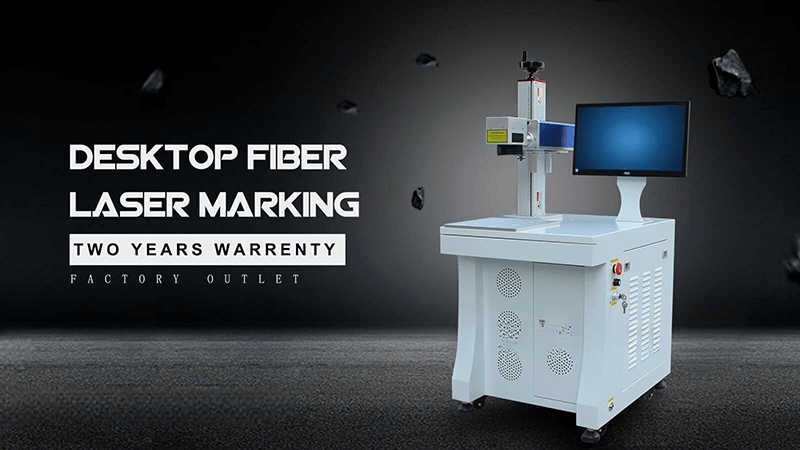
For small businesses, I recommend choosing a desktop laser machine based on material and job type. A fiber laser marker is best for metal logos, serial numbers, and QR codes. A CO2 laser is better for cutting or engraving wood, acrylic, leather, and similar non-metal materials.
I see many customers make the mistake of buying a machine before they clearly define their material. This can lead to poor results and wasted money.
Fiber Laser Marking Machines for Metal Products
I recommend desktop fiber laser marking machines for small businesses that work with metal products. These businesses may sell jewelry, tools, metal gifts, machine parts, tags, hardware, cups, knives, and industrial components.
Fiber laser marking machines are excellent for permanent marks.5 They can create logos, barcodes, QR codes, serial numbers, and product information. They do not usually cut thick metal sheets. Their main purpose is marking and engraving.
For many small businesses, this is enough. They do not need sheet metal cutting. They need product branding and traceability.
CO2 Lasers for Non-Metal Cutting
I recommend CO2 laser machines for businesses that cut or engrave non-metal materials. These include acrylic signs, wooden gifts, leather products, rubber stamps, packaging materials, and decorative items.
A CO2 laser is a good choice for craft businesses, gift businesses, sign shops, and small custom product studios. It can cut thin non-metal materials and create detailed engraved designs.
Still, I tell customers to check the machine bed size, ventilation needs, material thickness, and local safety rules6 before they buy.
Small Businesses Need Simple Operation
Small businesses often have limited staff. They may not have an engineer on site. For this reason, I focus on machines that are easy to install and easy to learn.
A desktop machine should have a clear control system, simple software setup, stable focusing method, and basic safety guidance. I also think the machine should fit inside the customer’s workspace without creating major layout changes.
| Small Business Need | Machine I Recommend | Typical Use |
|---|---|---|
| Metal logo marking | Fiber laser marker | Tools, jewelry, parts |
| QR code marking | Fiber laser marker | Traceability labels |
| Anodized aluminum marking | MOPA fiber laser | Electronics, consumer products |
| Wood engraving | CO2 laser | Gifts, signs, decorations |
| Acrylic cutting | CO2 laser | Display signs, custom products |
| Plastic fine marking | UV laser | Electronics, small parts |
| Curved metal marking | 3D fiber laser | Bottles, tools, shaped products |
I often tell small business buyers not to choose only based on the lowest price. A low-cost machine may look attractive at first, but poor marking quality, weak support, or difficult software can create more problems later.
I prefer to help customers choose a machine that matches their daily work. This gives them a better chance to earn money from the machine instead of spending time fixing it.
Thinking of getting into laser engraving. What machine I should get?
Many first-time buyers feel excited about laser engraving, but they also feel confused by the number of machine types. I understand this because the market has many different laser sources, power levels, and machine designs.
For beginners, I usually recommend starting with a desktop laser machine that matches the main material. I recommend fiber laser marking machines for metal and plastic, CO2 lasers for wood and acrylic, and MOPA or UV lasers when customers need special marking results.
I always start with a simple question: what material will the customer mark or engrave most often?
Start with the Main Material
I do not recommend buying a laser machine based only on online videos. A machine may look impressive in a demonstration, but it may not work well for the customer’s actual products.
For metal products, I recommend a desktop fiber laser marking machine7. This is a practical choice for stainless steel, aluminum, brass, copper, coated metal, and many plastic products.
For wood, acrylic, leather, paper, and fabric, I recommend a CO2 laser. This machine type is better for creative engraving and cutting work.
For sensitive plastic, glass, film, and electronics, I recommend UV laser marking. This machine creates less heat impact and can produce cleaner fine marks.
Choose a Power Level That Fits the Job
For basic metal marking, I usually recommend 20W or 30W fiber laser marking machines. These machines are compact and suitable for many common applications.
For deeper engraving or faster production, I recommend 50W fiber lasers. For color marking on stainless steel or black marking on anodized aluminum, I recommend MOPA fiber lasers8.
I do not suggest that beginners buy the highest power immediately. I think buyers should first understand their product type and expected production volume.
Think Like a Business Owner
I also ask buyers about their business plan. Some buyers want a machine for personal projects. Some want to sell custom products online. Some want to add marking services to an existing workshop.
A machine should fit the business model. A small custom gift business may need a CO2 laser. A hardware supplier may need a fiber laser marker. An electronics supplier may need MOPA or UV technology.
| Buyer Type | Main Material | Machine I Recommend | Reason |
|---|---|---|---|
| Custom gift seller | Wood, leather, acrylic | CO2 laser | Good for creative products |
| Metal product seller | Steel, aluminum, brass | Fiber laser marker | Permanent metal marking |
| Tool workshop | Metal tools and parts | 30W or 50W fiber laser | Faster and deeper marking |
| Electronics supplier | Plastic, anodized aluminum | MOPA or UV laser | Fine and clean marks |
| Industrial distributor | Mixed customer needs | Fiber laser product range | Easy to resell |
| Premium product brand | Stainless steel, coated metal | MOPA fiber laser | Better visual results |
For first-time distributors, I usually recommend starting with a desktop fiber laser marking machine range. These machines are compact, easy to demonstrate, and useful across many industries.
I also recommend keeping the product line simple at the beginning. A distributor can start with 20W, 30W, and MOPA fiber laser options. Later, the distributor can add UV lasers, CO2 machines, or 3D dynamic marking systems when customers ask for more specialized applications.
At Kirin Laser, I try to help distributors build a product range that they can understand, support, and sell with confidence. I believe a good laser machine is not only about laser power. It is also about easy installation, stable quality, clear communication, and long-term service.
Conclusion
I recommend desktop laser marking machines because they are compact, flexible, and easy to sell into many markets. I see 20W and 30W fiber laser machines as strong starting products for distributors and small workshops. I recommend MOPA, UV, CO2, and 3D systems when customers need special materials or advanced results. At Kirin Laser, I focus on helping distributors choose practical machines that match real customer needs, support OEM branding, and create reliable long-term business value.
-
"How to Engrave Metal With a Fiber Laser: Settings and ...", https://themakerschest.com/blogs/laser-engravers/how-to-engrave-metal-with-a-fiber-laser-settings-and-speed-guide?srsltid=AfmBOopxx96feY2_TIe5n5a39wwLJwSzeGH_yLbzF-ud53c8iQNUPYyc. A technical review or educational source on laser marking can support that fiber laser systems are commonly used for permanent marking of metals and selected polymers, including identifiers such as serial numbers, barcodes, and data-matrix or QR-style codes. Evidence role: general_support; source type: education. Supports: A 20W fiber laser marking machine is suitable for common identification marks on metals and many plastics.. Scope note: Material compatibility depends on laser wavelength, additives, surface finish, and process parameters; the source may support typical applications rather than every listed material equally. ↩
-
"Rapid and flexible laser marking and engraving of tilted ...", https://www.sciencedirect.com/science/article/abs/pii/S0143816610001946. A technical source on 3D laser marking or dynamic focusing systems can support that three-axis scanner and dynamic-focus configurations extend the usable focal range, allowing marking over larger fields and non-planar or curved surfaces compared with simple two-axis flat-field marking. Evidence role: mechanism; source type: research. Supports: Desktop 3D dynamic fiber laser marking machines are used for large work areas, curved surfaces, deep engraving, and complex products.. Scope note: The source may support dynamic focusing for large or curved surfaces, while deep engraving performance still depends on laser power, material, and process parameters. ↩
-
"A Review on Parametric Optimization of Laser Engraving using ...", https://www.academia.edu/20049764/A_Review_on_Parametric_Optimization_of_Laser_Engraving_using_Fiber_Laser_on_Steel. Technical literature on fiber-laser marking describes the laser source and beam/output parameters as key determinants of mark quality, process speed, and operational stability in industrial marking applications. Evidence role: mechanism; source type: paper. Supports: A fiber laser source affects marking quality, speed, service life, and long-term stability.. Scope note: Such sources generally explain the relationship between laser parameters and marking outcomes, but they may not quantify service life for a specific commercial machine. ↩
-
"Experimental study of laser engraving on acrylic - ScienceDirect.com", https://www.sciencedirect.com/science/article/pii/S2949822826005071. Studies of laser marking and laser-material processing identify process parameters, material properties, scan speed, laser power, marking depth, and pattern geometry as variables that influence marking time and quality. Evidence role: expert_consensus; source type: paper. Supports: Marking speed depends on multiple factors besides laser wattage, including material, marking depth, content geometry, and software/process settings.. Scope note: The evidence is likely to support the general dependency of marking performance on multiple parameters rather than this exact list of production factors. ↩
-
"Master Laser Engraving Tutorials: Expert Tips & Tricks", https://imba.missouri.edu/laser-engraving-tutorials-0640579909.html. A peer-reviewed or institutional source on laser marking should support that fiber lasers can form durable marks on metals through localized surface modification such as engraving, annealing, or ablation. Evidence role: mechanism; source type: paper. Supports: Fiber laser marking machines are suitable for creating permanent marks on metal products.. Scope note: The durability of a mark depends on material, laser parameters, surface finish, and post-processing conditions. ↩
-
"Reducing harmful fumes from laser engraver? - Facebook", https://www.facebook.com/groups/1107794240516228/posts/1518864749409173/. A government or standards-based source on laser safety should support that laser cutting and engraving require attention to ventilation, material hazards, exposure controls, and applicable safety requirements. Evidence role: expert_consensus; source type: government. Supports: Buyers should evaluate ventilation, material limits, and safety rules before purchasing a laser machine.. Scope note: Specific legal requirements differ by jurisdiction and by laser class, enclosure design, and materials processed. ↩
-
"Fiber Metal Marking and Engraving Laser Machines", https://www.epiloglaser.com/how-it-works/laser-marking-metal/. A neutral technical source on laser marking explains that fiber lasers are commonly used for marking metals because their near-infrared output can be focused to small spots and produces durable surface modification; this supports the suitability claim at a general technology level. Evidence role: general_support; source type: encyclopedia. Supports: A desktop fiber laser marking machine is a practical choice for stainless steel, aluminum, brass, copper, coated metal, and many plastic products.. Scope note: The source would support general material suitability, not the specific desktop format or any particular machine model. ↩
-
"How to Color Engrave Stainless Steel with MOPA Fiber Laser", https://hispeedlaser.com/blog/how-to-color-engrave-stainless-steel-with-mopa-fiber-laser/. Technical literature on MOPA fiber lasers describes how adjustable pulse duration and repetition rate influence surface oxidation, color effects, and contrast in laser marking, supporting their use for stainless-steel color marking and high-contrast anodized-aluminum marking. Evidence role: mechanism; source type: paper. Supports: MOPA fiber lasers are suitable for color marking on stainless steel and black marking on anodized aluminum.. Scope note: The evidence supports the parameter-control mechanism; specific colors or black marks still depend on alloy, anodizing process, surface finish, and optimized settings. ↩